How to Make Alex Minecraft Costume
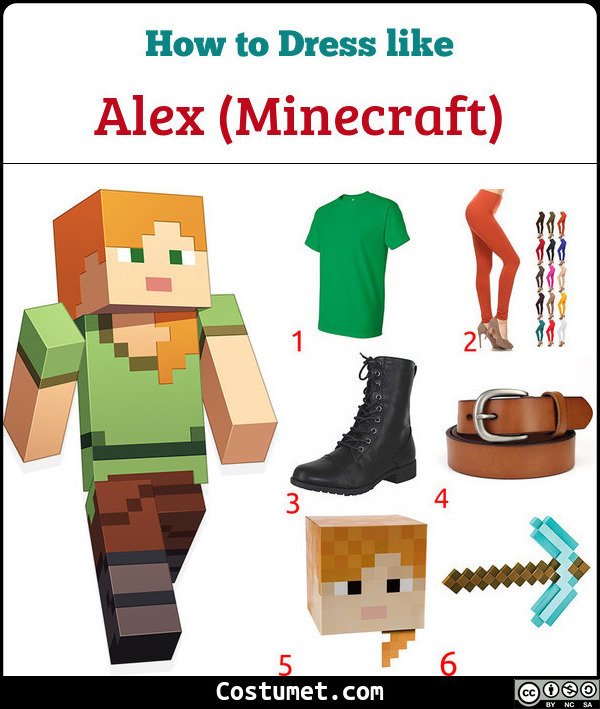 Green ShirtRust LeggingsBlack BootsBrown BeltAlex BlockheadPixelated PickaxeSaveTap any item in the photo to shop itClick any item in the photo to shop it
| # | Item | Description | Shop |
|---|---|---|---|
| 1 | Green Shirt | Start with a simple green shirt for your Alex outfit. | 🛒 Check on Amazon |
| 2 | Rust Leggings | Stick to the nature color theme and wear a pair of rust leggings. | 🛒 Check on Amazon |
| 3 | Black Boots | Remember to wear a sturdy pair of boots before you go out exploring. | 🛒 Check on Amazon |
| 4 | Brown Belt | Put on a brown belt around your waist. | 🛒 Check on Amazon |
| 5 | Alex Blockhead | Want to look pixelated? Wear an Alex Blockhead accessory. | 🛒 Check on Amazon |
| 6 | Pixelated Pickaxe | Don’t forget to bring your pickaxe. | 🛒 Check on Amazon |
| 7 | Costume Set | Don’t want to DIY? Get a costume set instead. | 🛒 Check on Amazon |
You’ve probably heard of the pixelated survival game called Minecraft. Almost every kid (and kids at heart) are playing it, after all. ‘Alex’ is Minecraft’s default female player skin. Her counterpart is called ‘Steve.’
Alex is a pixelated female player with orange hair and pale skin. She wears a bright green shirt with a brown belt around the waist. She also wears a pair of rust-colored pants and a pair of black boots. Alex can wield weapons like a pickaxe or sword. Here’s everything you need to look like Alex from Minecraft.
About Alex Minecraft
“Alex” or the default female player Skin option only became available in Minecraft’s update 1.8.
Check out these sites to read more about Alex and the other characters from Minecraft: